
An easy-to-use screen recorder!
CamStudio is one of the most comprehensive, functional, and popular screen-recording software programs. If you’re interested in going beyond simple illustrations and need something to create amazing product demos or IT tutorials, this screen recorder will be an excellent choice. For many years, the program has been used by developers to provide technical support. With a simple and clean interface, the tool is easy to navigate and doesn’t require you to possess any special skills. While CamStudio offers limited output file formats, i.e. AVI, you can use the program to convert AVI files to SWFs.
A simple yet powerful screen recording tool!
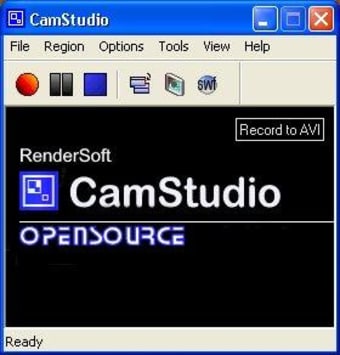
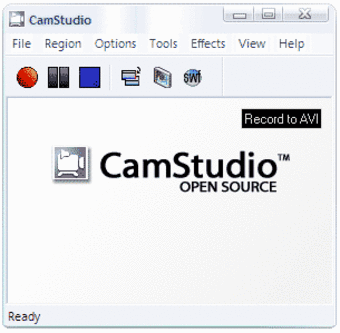
When you download CamStudio, the program allows you to record AVI or SWF videos of the desktop screen. Since it’s a lightweight program, you can run CamStudio on a wide range of Microsoft Windows PCs, regardless of the hardware configuration. The toolbar lets you start, stop, and pause the recording in a single click. It also allows you to toggle the view, change the display screen options, and choose the preferred recording mode, i.e., SWF or AVI.
How to use CamStudio?
Compared to AMCap and Snagit, this free screen recorder is easier to use. With a couple of clicks, you can choose the specific area you want to record. CamStudio lets you manually select an area, window, region, or the entire screen. Additionally, you can use video and screen annotations to enhance the video output. Most importantly, the program comes with basic video editing features, which allow you to add effects—including captions, Xnote time stamps, system time stamps, and watermarks.
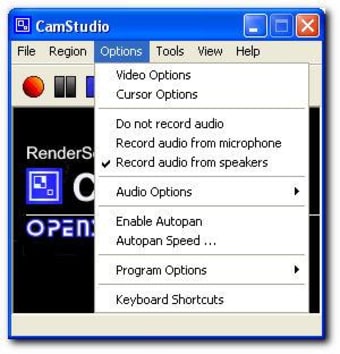
From Video Options, CamStudio lets you select time-lapse settings, the quality, framerate, and compressor. Similarly, you can use Cursor Options to show or hide the cursor, enable visual feedback, and highlight certain areas on the screen. The program also lets you play around with Audio Options, which can customize speakers, the microphone, and video/audio synchronization.
Does CamStudio have customization options?
While Snipping Tool++ and other similar programs allow you to take screenshots, they don’t offer a lot of customization options. On the other hand, CamStudio can be used to convert AVI files to SWFs, set pan speed, disable audio recordings, use keyboard shortcuts, and stop the recording automatically.
Moreover, while doing all this, the program doesn’t use a lot of system resources—and as such, you don’t have to worry about the PC slowing down. With CamStudio, both the video and audio quality are excellent. Unfortunately, the program doesn’t have a Help section, but you can easily search for troubleshooting information online.
Is CamStudio a good choice?
While there are plenty of screen recorders available online, CamStudio has been immensely popular among Windows users around the world. Compared to FastStone Capture and similar titles, it’s a comprehensive package with basic video-editing features. The open-source program allows you to grab the desktop screen, take video screenshots, and capture images to create product demos, IT tutorials, and presentations.
While a lot of people use screen recorders to capture static images on the screen, a video grabber can do a lot more. If you’re interested in creating amazing video tutorials—especially for product demonstrations—CamStudio will be an excellent choice.
Simply put, CamStudio records the video and audio activity on the computer’s screen to create AVI video files. Moreover, it lets you turn these files into Flash videos (SWF). With this free screen recorder, you can add video annotations, screen captions, and other effects to the output files. It’s the perfect way to produce a webcam movie yourself or create amazing illustrations and demos.
It’s worth mentioning that CamStudio features a built-in lossless codec, which produces high-quality results in small file sizes. As such, you don’t have to worry about the files taking too much space on your hard disk. With CamStudio, you can record the entire screen, a specific region, or manually cut a specific area on the desktop. Last but not least, the program is easy to navigate and use.
A hassle-free recording software!
CamStudio is one of the most useful screen recording software around, which merges a wide range of features available in popular video capture and editing packages. The latest version of the program lets you choose from multiple codecs, allowing you to play around with different file formats. While the output file format is only available in AVI, you can use the built-in converter to create SWFs. With CamStudio, you’re able to take screenshots and turn them into virtual art forms.